Rename.Tools LogoRename.Tools
FeaturesGuidesApp
RRename.Tools

A powerful browser-based bulk file renaming tool. Supports regex, rule chains, live preview — all processing done locally with complete privacy.

Local file processing · No file uploads

Legal

  • Terms of Service
  • Privacy Policy
  • Disclaimer

Resources

  • About
  • All Features
  • Guides
  • GitHub
  • Report an Issue
  • Changelog

Languages

  • English
  • 中文
  • 日本語
  • Español
  • Français
  • 한국어
  • Deutsch

© 2026 Rename.Tools. All rights reserved.

Made with by developers

Rename.Tools LogoRename.Tools

Bulk rename files online. Right in your browser.

7 Rule Types•Live Preview•Zero Uploads

Rename local files directly with regex, sequences and live preview. No uploads or ZIP files to download again.

Direct renaming in supported desktop Chrome and Edge browsers. Other browsers can export rename scripts.

Start RenamingView on GitHub
Open Sourceon GitHub
•

Free forever • No sign-up • Works offline

See the result. Try it with sample names.

Choose a task, review its rules and preview the changes. No files or sign-up needed.

Photos with a fixed date and sequence

Before
IMG_0421.jpg
After
2026-05-22_001_tokyo.jpg
Before
IMG_0422.jpg
After
2026-05-22_002_tokyo.jpg

Uses the literal date 2026-05-22, not EXIF metadata. Change the date and location before using your own photos.

Try this example

Review the rules, then preview sample filenames without changing real files.

Read the guide

Add a project prefix and version suffix

Before
proposal.pdf
After
client-a_proposal_review.pdf
Before
budget.xlsx
After
client-a_budget_review.xlsx

Adds client-a_ at the start and _review before the extension. Existing names and extensions stay intact.

Try this example

Review the rules, then preview sample filenames without changing real files.

Read the guide

Replace spaces with underscores

Before
Quarterly Report 2026.pdf
After
Quarterly_Report_2026.pdf
Before
draft final.txt
After
draft__final.txt

Replaces every ordinary space with an underscore. Two consecutive spaces become two underscores; other punctuation and extensions are unchanged.

Try this example

Review the rules, then preview sample filenames without changing real files.

Read the guide
Why Rename.Tools

Everything you need, nothing you don't

A focused set of capabilities designed to make bulk renaming fast, safe, and predictable.

Rule Chains

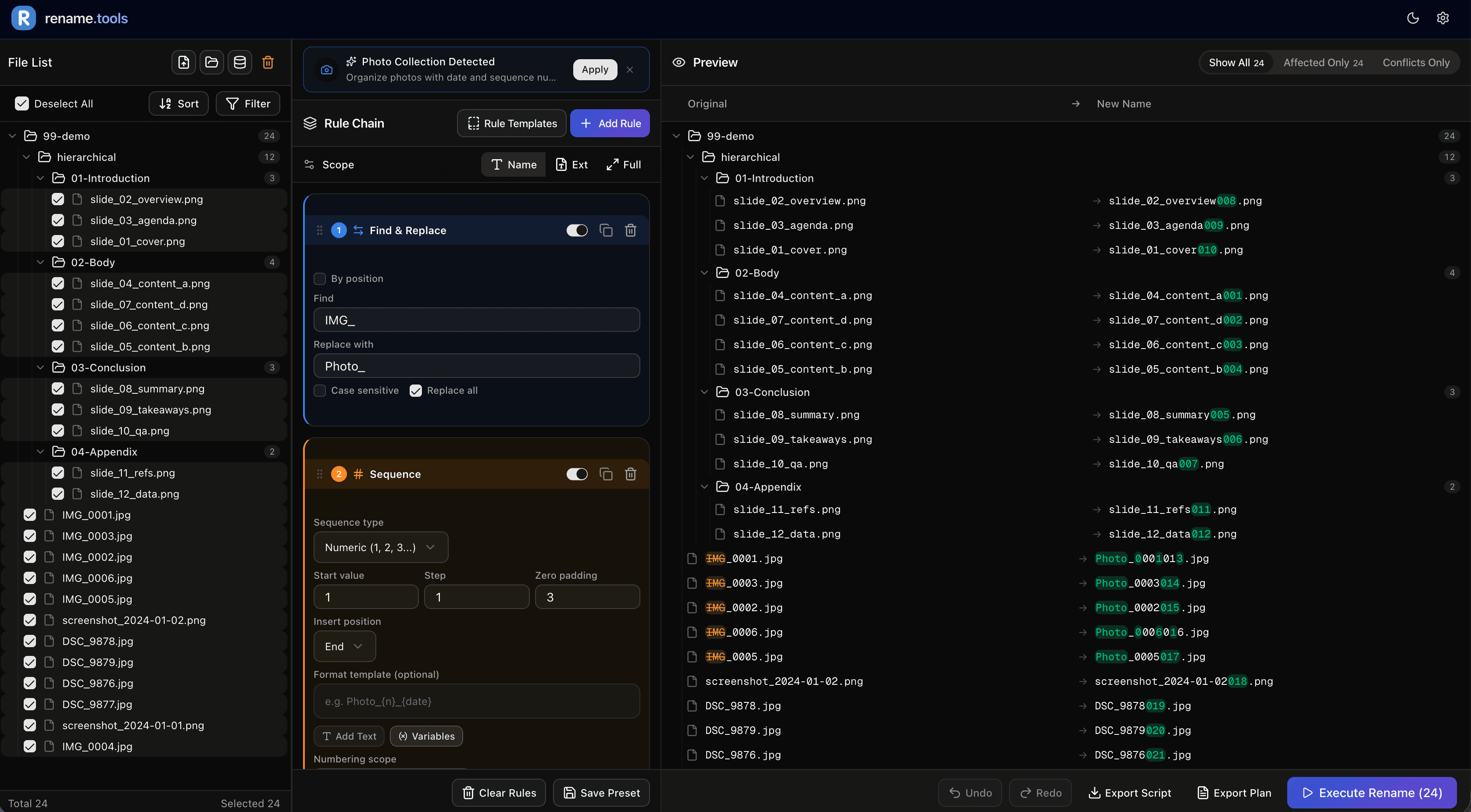
Combine 7 rule types — find & replace, regex, sequences, case conversion, insert, remove, and custom JS — in any order

Live Preview

Every change updates instantly as you type. See original names, new names, and conflicts in real time

Conflict Detection

Automatically spots duplicate filenames before you rename, preventing accidental overwrites

100% Local & Private

File renaming and metadata extraction run locally in your browser without uploading your files. Optional TMDb lookups send search terms to TMDb. Website visit statistics are separate from file processing.

Undo & Script Export

Built-in undo/redo support, plus export as Bash or PowerShell scripts for offline execution or rollback

Free & Open Source

No sign-up, no trials, no paywalls. Fully transparent code on GitHub, community-driven
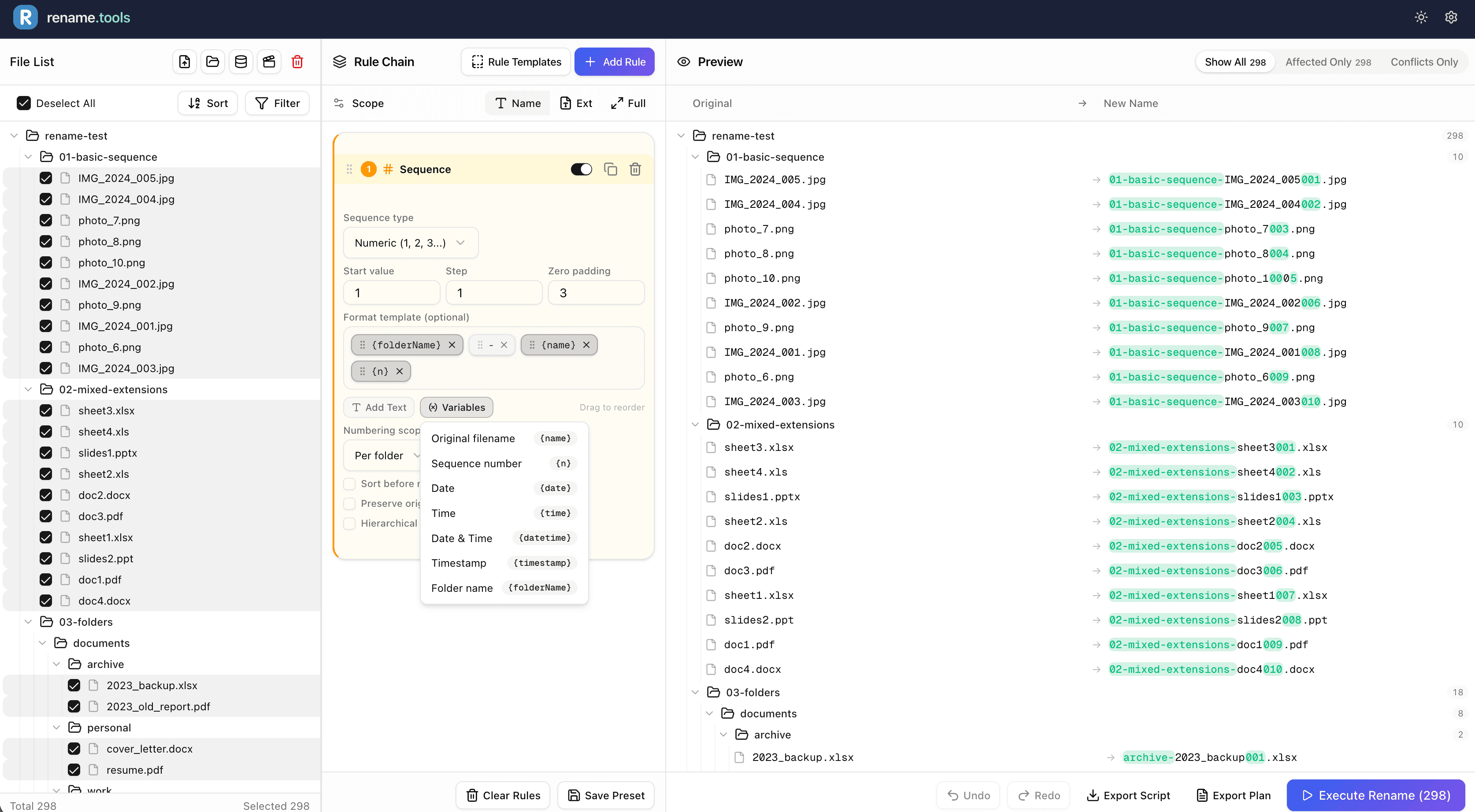
Rename.Tools Rule Chain InterfaceRename.Tools Rule Chain Interface
Use Cases

Perfect for any workflow

Whether you're organizing photos, managing media libraries, or cleaning up project files — Rename.Tools adapts to your needs.

Organize thousands of photos in seconds

Rename vacation photos with dates, add location prefixes, or create consistent naming from camera files like DSC_0001.jpg to meaningful names.

Rule Chain
1Sequence2024-03-15_{n} · 001, 002, 003…
Preview
OriginalNew Name
IMG_0421.jpg2024-03-15_001.jpg
IMG_0422.jpg2024-03-15_002.jpg
IMG_0423.jpg2024-03-15_003.jpg
IMG_0424.jpg2024-03-15_004.jpg
Photo date and numbering guide

Manage video files with ease

Clean up downloaded video names, add episode numbers to series, or standardize your media library naming conventions.

Rule Chain
1Regex(.+)\.s(\d+)e(\d+).* → $1 S$2E$3
2Find & Replace"." → " "
3Case/StyleTitle Case
Preview
OriginalNew Name
breaking.bad.s01e01.720p.mkvBreaking Bad S01E01.mkv
breaking.bad.s01e02.720p.mkvBreaking Bad S01E02.mkv
breaking.bad.s01e03.720p.mkvBreaking Bad S01E03.mkv
breaking.bad.s01e04.720p.mkvBreaking Bad S01E04.mkv
Music and video naming guide

Organize your music library

Format track names, add artist prefixes, clean up downloaded filenames, or prepare files for media servers.

Rule Chain
1Case/StyleTitle Case
2Insert"{media.artist} - " at start
3Sequence{n}. {name} · 01, 02, 03…
Preview
OriginalNew Name
love story.mp301. Taylor Swift - Love Story.mp3
shake it off.mp302. Taylor Swift - Shake It Off.mp3
blank space.mp303. Taylor Swift - Blank Space.mp3
bad blood.mp304. Taylor Swift - Bad Blood.mp3
Music and video naming guide

Refactor file structures

Bulk rename components, convert naming conventions (camelCase to kebab-case), or prepare assets for deployment.

Rule Chain
1Case/Stylekebab-case
Preview
OriginalNew Name
MyComponent.tsxmy-component.tsx
UserProfile.tsxuser-profile.tsx
NavBar.tsxnav-bar.tsx
DataTable.tsxdata-table.tsx
Bulk renaming guide

Tame your document chaos

Add date prefixes, remove version suffixes, standardize naming across departments, or prepare files for archival.

Rule Chain
1Regex\s*[\(\[].*?[\)\]] → ∅
2Case/Stylekebab-case
3Insert"2024-03-15_"
Preview
OriginalNew Name
report (final v3).pdf2024-03-15_report.pdf
budget [2024].xlsx2024-03-15_budget.xlsx
meeting notes (draft).docx2024-03-15_meeting-notes.docx
project plan (v2).pptx2024-03-15_project-plan.pptx
Bulk renaming guide

Stop renaming files one by one.

Rename.Tools gives you the power to rename thousands of files with precision and confidence. No sign-up, no downloads, no uploads.

Start Renaming Now

Free forever • No sign-up • Works offline


Frequently asked questions

Everything you need to know about Rename.Tools and how it helps you manage file names at scale.

Is Rename.Tools really free?

Yes, completely free and open source. There are no premium tiers, no trials, and no hidden fees. The full source code is available on GitHub under the AGPL-3.0 license.

Do my files get uploaded to a server?

File renaming and metadata extraction run locally in your browser without uploading your files. Optional TMDb lookups send search terms to TMDb. Website visit statistics are separate from file processing.

Why is it safe to use?

You choose which files the browser can access. Preview the proposed names and resolve conflicts before executing; use Undo if needed. File processing stays local. Website analytics are described separately in our privacy policy.

What browsers are supported?

Rename.Tools works best in Chromium-based browsers (Chrome, Edge, Brave, Arc) which support the File System Access API for direct renaming. In other browsers, you can use sample test mode or export rename scripts.

How many files can it handle?

Rename.Tools can handle thousands of files in a single batch. The live preview updates in real time even with large file sets. Performance depends on your browser and device capabilities.